
Buy or sell something on Facebook marketplace
Buying more used items not only saves money, but helps to reduce waste and extra manufacturing.
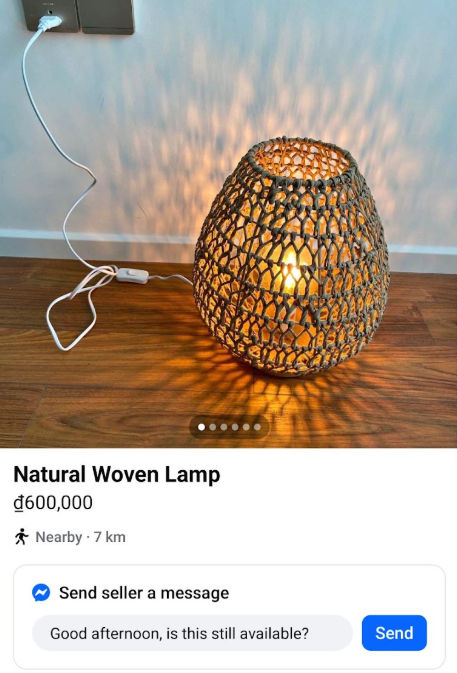
A while ago, I bought a lamp on Facebook Marketplace — a small wooden one with a woven shade. The seller lived just a few blocks away and said it had been in her guest room for years. It wasn’t expensive or rare, but there was something lovely about it. I liked that it already had a bit of history, and that I didn’t have to buy something new to brighten my room. That little exchange reminded me how reuse can feel personal, not just practical.
There’s something oddly comforting about secondhand things. Maybe it’s the story they carry, or the small sense of satisfaction that comes from giving something another round of use. Lately, places like Facebook Marketplace have quietly become the modern version of community trading — a space where one person’s “no longer needed” becomes someone else’s “exactly what I was looking for.”
For me, buying or selling on Marketplace isn’t really about decluttering or finding bargains, though that’s part of it. It’s about slowing the cycle of stuff, even just a little. Instead of tossing an old chair or buying another blender brand new, you get to participate in a kind of informal reuse system. It’s not revolutionary, but it’s real — and it happens every day, in neighborhoods you drive through without noticing.
The process itself is surprisingly easy. Listings are local, messages are quick, and there’s no auction or waiting game like on older resale sites. You take a few photos, write a short note, and that’s it. You might meet someone at a coffee shop or outside a grocery store, exchange a few words, and both walk away a little lighter — one with cash, the other with something they needed.
How Facebook Marketplace Works
How to Get to It
- On desktop: Go to Facebook and click the Marketplace icon (looks like a small storefront) on the left sidebar.
- On mobile: Open the Facebook app → tap the Menu (☰) → select Marketplace.
- If you don’t see it, you may need to update the app or confirm your location settings.
How to Search and Browse
- Use the search bar to look for specific items (e.g., “desk,” “bike,” “dining chair”).
- Filter by location, price range, condition, and delivery/pickup options.
- You can save items to watch and revisit them later.
How Buying Works
- When you find something you like, click Message or Send Seller a Note to ask if it’s still available.
- Confirm details: price, condition, pickup time, and location.
- Most purchases are paid in person with cash or mobile payment apps (like Venmo, Zelle, PayPal). People typically pick up at the seller's location or meet in a public place nearby.
How Selling Works
- Go to Marketplace → Create New Listing → Item for Sale.
- Add photos, title, category, price, and description.
- Set your pickup location (you don’t need to give your exact address—use a nearby landmark or “meet at Starbucks”).
- Once someone messages, coordinate timing, payment, and pickup.
Want to do more?
Get updates on climate progress and how you can help.